Thursday, 25 July 2024


Source :  Internet


What is Plain Old Telephone Service (POTS)?

Plain Old Telephone Service (POTS) refers to the traditional, analog voice transmission phone system implemented over physical copper wires (twisted pair).

Simply put, POTS is the basic telephone call service that individuals and businesses have been using since the 1880s. It is an upgrade over the rudimentary phone system invented by Alexander Graham Bell.

However, the roles served by POTS are steadily being assumed by digital technologies.

History of POTS

In its early days, POTS was known as the Post Office Telephone Service because callers relied on post office operators to connect them to their destinations. Once the service was moved away from the post office, the term was changed to Plain Old Telephone Service. POTS is also known as public switched telephone network (PSTN).

Today, the term POTS is sometimes used in discussions of new telephone technologies in which the question of whether -- and how -- existing voice transmission for ordinary phone communication can be accommodated.

Asymmetric Digital Subscriber Line (DSL) and Integrated Services Digital Network (ISDN) connections provide some part of their bandwidth for POTS, and most of the remaining bandwidth is used for digital data transmission.
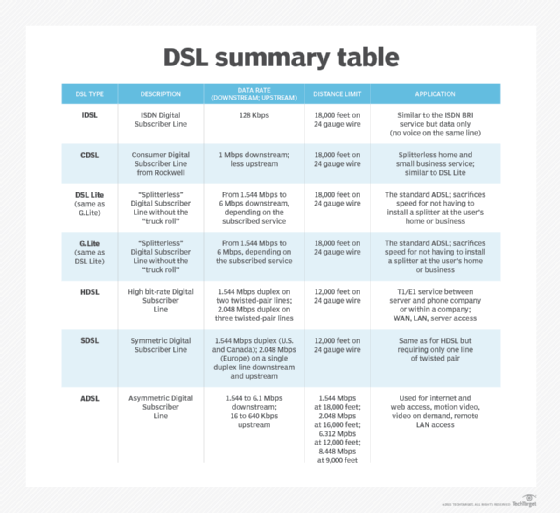
DSL summary table
Asymmetric Digital Subscriber Line, Integrated Services Digital Network and digital data transmission constitute the bandwidth of POTS today.

Telephony before Plain Old Telephone Service

Before the development of POTS, establishing a connection between two parties required stretching wires between the two points. As distances between these parties increased, longer wires were needed to connect them, increasing the cost of the connection.

This is why long-distance calls were more expensive than short-distance calls. POTS helped bring down these costs by placing switches at certain centralized points in the network. These switches functioned as communication nodes between two points in the network.

A pre-POTS standard practice, for example, was operators. To connect callers to their intended destination, human operators were required to perform circuit switching, the practice of plugging wires into a common patch panel to connect the caller and the receiver. If a connection required two exchanges, two operators would simultaneously plug both the caller's and receiver's wires into the same interexchange wire called a trunk -- hence the term trunk call.

POTS eliminated the need for operators by automating the switching process. It worked by responding to signals from a calling device.

The old telephone network also consisted of electromechanical switches that did some of the tasks handled by operators. Furthermore, all the call functions of the network elements were wired into them, creating an inflexible hardware arrangement. So, when a caller dialed a destination telephone number, each successive digit in the number would generate a series of quick electrical impulses. These impulses would then activate a sequence of rotary switches at the telephone company's central office.

At this point, an electrical current would be sent to an on-hook phone -- i.e., a phone that's not already engaged in another call. The electrical current would activate the phone's bell, and it would ring. Since the hardware arrangement in this system was preset, it was not possible to give specific instructions to the rotary switches -- e.g., to block calls from certain numbers -- or to forward calls to another number.

How does a POTS line work?

To implement a telephone call, the various elements of the POTS network work together to execute a sequence of steps. But, in general, POTS works by establishing a dedicated circuit (connection) between two points -- say, Point A and Point B -- for the duration of a transmission between them. Copper wires connect these two points.

To establish the connection and enable the parties to communicate over the POTS line, the call is routed over one or more switches operating locally, nationally or internationally.

To transmit voice along the POTS line, the sound waves are first converted into electrical analog signals that flow through the network. Copper wires carry these signals with the help of switches. The signals are then converted back into sound waves that fall on the receiver's telephone handset, enabling them to hear the caller.

Copper wires are generally susceptible to noise, which creates interference over the network. The signals also tend to get weaker as they travel over longer distances, so amplification may be required to carry them to their destination.

Important concepts in POTS

Here are a few important concepts in POTS:

  • Idle state or on-hook. When the handset of Telephone A is not in use, it is idle or on-hook. This is the initial state. When the handset is picked up, a dial tone is heard.
  • Off-hook. When Telephone A calls Telephone B, Telephone A is said to be off-hook.
  • Ringback tone. When Telephone A calls Telephone B, Telephone B rings, and a ringback tone is heard at Telephone A.

The evolution of transistors and modems

POTS only carried analog signals between two points in the network. The development of the transistor paved the way for digital networks, enabling phone lines to carry digital signals sent in the form of discrete packets.

Unlike the analog system, packet-based technology does not require a continuously open and dedicated circuit or channel. Instead, it uses the underlying network and switches to transmit voice and data messages independently. But, for this to happen, copper wires are not enough.
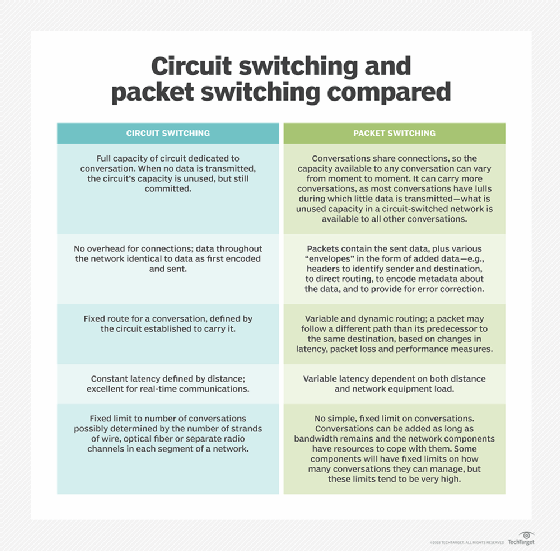
circuit switching vs. packet switching

These copper wires are bidirectional and can carry human voice in full duplex mode -- i.e., in both directions simultaneously. However, since they have a limited frequency band (300 hertz to 3,400 Hz), they cannot transmit digital signals, which are binary -- i.e., in the form of either 0 or 1. This is where a modem plays an important role.

The modem enables digital capability to be added to the existing analog POTS without the need for a complete overhaul. The following are two common modem types.

Integrated Services Digital Network (ISDN)

ISDN enables the transmission of both voice and data over a regular copper phone line. It was one of the earliest attempts to provide digital services via copper pair wires.

ISDN offers faster connections and higher-quality calls than standard POTS. It can also be integrated with other phone systems, like a private automatic branch exchange. For these reasons, ISDN is best suited for large companies or rapidly expanding businesses. The fees for using the service are calculated based on transmission duration.
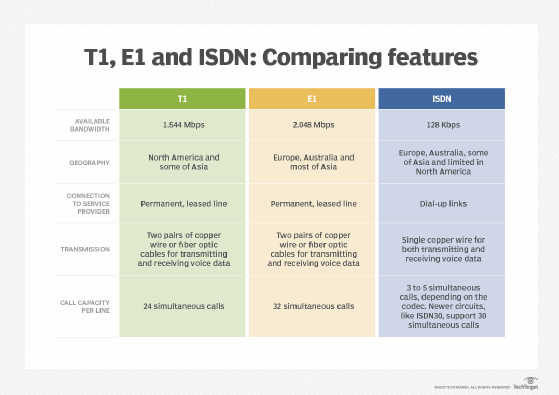
comparing T1, E1 and ISDN features
Telecommunications networks have used T1, E1 and ISDN network technology to transmit voice data for years.

Digital Subscriber Line (DSL)

DSL enables data transmission over POTS. A transceiver connects to a computer and uses the local phone network to connect to the network of an internet service provider (ISP), enabling the computer to access the internet.

Like ISDN, DSL is a last-mile solution that provides digital service over existing copper pairs. But, unlike ISDN, DSL offers speeds of 10 megabits per second or more, which is why it is more widely used. A DSL modem is most useful for individual users or small businesses since it provides just enough bandwidth for a limited number of users to access the internet.

POTS to voice over Internet Protocol (VoIP)

Over the years, POTS has evolved and given rise to newer technologies. The development of transistors and modems to add digital capabilities to analog POTS is one example. The other is voice over Internet Protocol (VoIP).

VoIP uses an existing internet connection to transmit voice and data messages between two parties. With VoIP, multiple remote offices can be connected while maintaining stable, resilient communications.
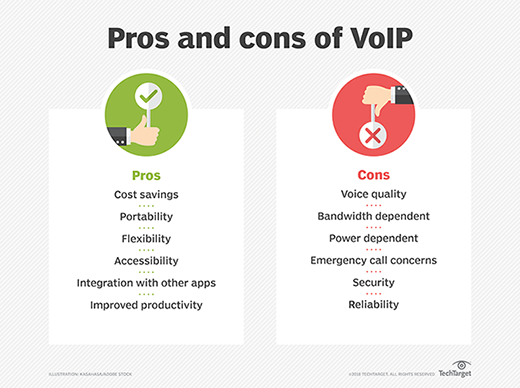
pros and cons of VoIP
POTS has evolved and given rise to newer technologies, like VoIP, in recent years.

It also offers features like interactive voice response, call forwarding and dynamic caller ID. One of the most common VoIP protocols is Real-time Transport Protocol, which carries streaming audio and video.

Unlike POTS, VoIP carries voice via packet-switched data networks, which reduces calling costs, especially for international calls. Two of its drawbacks are security and downtime. If an attacker compromises a network, it may compromise the confidentiality and integrity of VoIP calls.

Furthermore, if the network goes down, both voice and data networks go down simultaneously.

This was last updated in August 2021

Continue Reading About Plain Old Telephone Service (POTS)

Dig Deeper on Network infrastructure

-ADS BY GOOGLE
Unified Communications
Advertisement


Microsoft Copilot+: Everything you'll be able to do with your new Snapdragon X Elite PC


 Source :  Internet


Microsoft Copilot+: Everything you'll be able to do with your new Snapdragon X Elite PC

Readers like you help support XDA. When you make a purchase using links on our site, we may earn an affiliate commission. Read More.
Square option 4

Microsoft just held one of its biggest product launches in its history. It reworked Windows to be optimized for Arm processors, Windows on Arm finally reached maturity with the launch of 14 devices from seven OEMs, and it all revolves around Copilot+, its AI PC initiative.

It's a big deal, and it changes the computing landscape. So, what does it all mean? Here's a breakdown.

What is Copilot+, and what can I do with it?

AI PCs are here

Copilot button

I know what you're thinking. It's the same thing everyone thinks when there's a major change is Windows. "I'm fine with the way I use my computer. Why would I want to change that?" I know. A computer is a tool we've been using mostly the same way for decades. It's like telling someone they need to start swinging a hammer differently.

Microsoft wants your computer to be friendlier. It wants it to be smart enough to work with you, not just do the things you tell it to. Speaking to XDA, Microsoft technical fellow Stevie Bathiche talked about going from being explicit to being implicit. In a briefing that also included Yusuf Mehdi and Widnows chief Pavan Davuluri, they even made reference to things being "fuzzy", like how if you click on something and miss the pixel, your PC should be smart enough to know to interact with that object.

To do this, the company says it reimagined how Windows works from the inside-out, and it reengineered it to be optimized for Arm processors, not that x86 is getting snubbed.

AI technology is moving fast, and while it's fun to poke fun at the blunders of LLMs, that won't be a thing forever. Less than six months ago, Intel Meteor Lake launched with NPUs less than a quarter as powerful as these. The hardware is advancing, and the software is keeping pace. They're two components that are driving each other forward, and Microsoft wants to be there.

HP OmniBook X EliteBook U-5
HP OmniBook X

Copilot+ is about the whole stack, from hardware, to software, to AI capabilities. Here are some of the features you'll see on Copilot+ PCs.

Recall

Remember Windows Timeline? It was a feature in Windows 10 that let you look at a timeline that allowed you to access things you were previously working on.

Recall is kind of like that, except with more natural language. You'll be able to scroll a timeline to find apps, documents, and more, but you'll be able to describe things you remember about the document to get back to it.

There's been some controversy about the feature, because Windows is taking screenshots of everything that you do, and frankly, it's very popular to assume Microsoft is spying on you without knowing all the facts.

RELATED
Microsoft's Copilot+ Recall feature isn't the privacy nightmare people seem to think it is

It's fine, really

Recall runs completely on-device, so it's not sending any of these screenshots back to Microsoft. That's why Copilot+ features aren't coming to any existing PCs. You need to meet the minimum requirements to run them locally.

You also have total control over it. You'll be asked if you want the feature turned on during Windows setup, you can easily pause it any time you want, you can exclude apps from appearing in Recall, and you can delete your entire Recall history with a button in settings.

Live Captions

Live Captions is exactly what it sounds like. You can take any video or livestream and it will give you captions in real-time. Not only that, but it can translate in 44 languages on the fly.

Cocreator

Microsoft Copilot Plus-5

Cocreator is a name for the feature that AI is probably best known for. You can use it to generate images or text. And remember, this is all happening on-device, so nothing is getting sent to the cloud for processing.

It's also working with you to create things. In Paint, you can start by making a rough drawing of something, and by using that along with a prompt, Cocreator will generate an image based on what it thinks you want. Any time you make adjustments to your drawings or the prompt, it adjusts its image as well.

Auto Super Resolution

Auto Super Resolution is a gaming feature. It improves both the resolution and frame rate of your games, and it promises not to impact performance. There have been promises like this in the past, so we'll see how it goes. After all, most Copilot+ PCs are going to have integrated graphics for the time being anyway.

New Windows Studio Effects

Microsoft Copilot Plus-9

Windows Studio Effects was the first suite of features for AI PCs, debuting all the way back with the Surface Pro X. It allowed you to blur your background, reframe your video, adjust your gaze so it appeared you were looking at the camera, and more.

Now, it's going to do more things like adjust your lighting, and add more filters to you can have a more creative background. Again, the theme is that this is all happening on-device, which is apparently better than just letting Google Meet do it.

Adaptive Dimming and Adaptive Lock

These are features that we've seen OEMs use, but now they'll be baked into Windows. The OS will know when you look away and it will dim the screen, and it will lock the PC if you walk away. It can also wake the computer when you return, using Windows Hello to seamlessly log you back in.

Copilot

There's not too much to say about Copilot itself, since that's a feature we've had on Windows PCs for a little while now. However, with Copilot+ PCs, much of Copilot will be able to run on-device, thanks to the more powerful NPUs.

Prism emulator

Windows on Arm laptops are getting a new Prism emulator, which will be a good 10-20% faster than the previous one. In fact, Microsoft boasts that it's every bit as good as Apple's Rosetta.

However, the company expects that with apps like Chrome, Photoshop, and a whole bunch more going native, you'll be spending 87% of your time in native apps. The rest of that time should be as smooth as possible. Still, the percentage of apps that run in emulation will get smaller over time. Slack is coming, and Adobe just announced Premiere Pro and Illustrator for next month.

Microsoft Copilot+ system requirements

Front view of the Dell XPS 13
Dell XPS 13

Microsoft laid out three things that your computer will need in order to meet the Copilot+ requirements:

  • An NPU capable of 40 TOPS or more
  • 16GB RAM
  • 256GB storage

This does not apply to any currently shipping laptop. If you bought into any of the AI PC hype around Intel Core Ultra the first time around, you're out of luck. Three processor families are going to support this: Qualcomm Snapdragon X, Intel Lunar Lake, and AMD Strix Point, with Qualcomm shipping first and Intel last.

The PC will have a Copilot key on the keyboard and will ship with Windows 11 version 24H2, which has the AI goodies listed above.

There's one other thing to note. You do need an NPU capable of 40TOPS. If you've got a desktop with an Nvidia GeForceRTX 4090, which is capable of 1,321TOPS, you're out of luck. That won't be classified as a Copilot+ PC, not until Intel starts shipping Arrow Lake later this year.

Copilot+ release date

Lenovo Yoga Slim 7x (9)
Lenovo Yoga Slim 7x

Every laptop that was announced on May 20 is available for preorder. They will ship on June 18, so that's the date that the entire first wave of Copilot+ PCs will be available. Obviously, they all include Qualcomm Snapdragon X series processors.

AMD Strix Point is next on deck. That should be announced soon, along with various laptops including it.

Then, we should see Intel Lunar Lake laptops pop up at IFA, so expect to be able to buy those in the third quarter of this year. If you're waiting on a Copilot+ desktop, Arrow Lake should arrive after that.

Latest

Intel Tech Tour Lunar Lake-7
Intel and AMD have better NPUs than Qualcomm on paper, but should you really care?
Surface Pro 11-38
The new Snapdragon X Elite laptops are great, but they're not for everyone
Close-up of a laptop keyboard with the Microsoft Copilot logo overlaid on top of it
You don't need a Copilot+ PC for these 4 incredible AI features
Image Playground running on an iPad
5 reasons why Apple can beat Copilot+ with Apple Intelligence
Lenovo Yoga Pro 9i-15
Tempted by Windows AI PCs? Here's how to make the transition from macOS easier
Copilot Plus laptops on a table.
Copilot+ is now here: Let's clear up everything about that controversial Recall feature
Copilot Recall (4)
Microsoft is adding more features to Recall despite its ongoing privacy issues
Ryzen AI 300_4
4 reasons you shouldn't be dismissive of NPUs and AI PCs
Yusuf Mehdi Copilot (1)
Microsoft's Copilot+ PCs won't take screenshots of everything you do, at least at launch
The Gaming page in the Microsoft Store.
Forget DLSS, Microsoft's Auto SR could be the game-changing Windows feature you didn't know you needed
Copilot Plus laptops on a table.
Microsoft will give you full control over which apps can use generative AI on Windows 11
Satya Nadella Copilot-1
These PCs don't support Copilot+, and it shows how little sense the requirements make
Yusuf Mehdi Copilot (9)
Microsoft is revamping how Recall works amid its PR nightmare
Satya Nadella Copilot-1
Microsoft is already planning the "next wave" of Snapdragon X Elite devices, and they'll release a lot sooner than you think
Copilot (9)
Microsoft Copilot+ won't support Intel or AMD processors at launch
Intel Tech Tour Lunar Lake-8
Intel promises that Lunar Lake will "bust the myth" that Arm is more efficient than x86
Microsoft Recall running on a Copilot+ device.
A security expert found that Recall saves plain-text logs, says that it "sets cybersecurity back a decade"
Someone using the G-Assist feature
Your next Nvidia gaming laptop will be compatible with Copilot+
Microsoft Recall running on a Copilot+ device.
With Microsoft Recall coming to Copilot+, how secure is on-device processing?
Surface Pro Surface Laptop (3)
With Windows 11 24H2 on the way and Windows 10 reaching End of Life, what can AI hold-outs do?
SEE MORE