 |
| Speedtest.net by Ookla run successfully using Iceweasel browser after installing ' flashplugin-nonfree ' package using Synaptic Package Manager that come preinstalled with Linux Operating System KNOPPIX 7.4 |
Thursday, 7 August 2014
Run Speedtest.net by Ookla after successfully installing ' flashplugin-nonfree '

Download and install the package ' flashplugin-nonfree ' using Synaptic Package Manager '
 |
| Installed ' flashplugin-nonfree ' using Synaptic Package Manager as shown above |
Wednesday, 6 August 2014
Google chrome software working and running on the Linux Operating System KNOPPIX 7.4 after installation of libappindicator1
root@Microknoppix:/home/knoppix#
root@Microknoppix:/home/knoppix#
root@Microknoppix:/home/knoppix#
ls -alh|more
total
59K
drwxr-xr-x
38 knoppix knoppix 488 Aug 7 11:19 .
drwxr-xr-x
4 root root 72 Aug 7 10:53 ..
drwx------
4 knoppix knoppix 2.0K Feb 3 2011 .adobe
drwx------
14 knoppix knoppix 240 Aug 7 10:57 .cache
drwx------
27 knoppix knoppix 176 Aug 7 10:57 .config
drwx------
3 knoppix knoppix 80 Aug 7 10:53 .dbus
drwxr-xr-x
2 knoppix knoppix 2.0K Jan 12 2010 .debtags
drwxr-xr-x
2 knoppix knoppix 72 Aug 7 10:53 Desktop
drwx------
2 knoppix knoppix 104 Aug 7 11:20 Downloads
drwxr-xr-x
2 knoppix knoppix 2.0K Apr 6 2012 .elinks
-rw-------
1 knoppix knoppix 16 Sep 14 2009 .esd_auth
drwxr-xr-x
6 knoppix knoppix 96 Aug 7 10:53 .gconf
drwx------
2 knoppix knoppix 2.0K Sep 13 2011 .gconfd
drwxr-xr-x
24 knoppix knoppix 6.0K Feb 4 2013 .gimp-2.8
drwx------
4 knoppix knoppix 72 Aug 7 10:53 .gnome
drwx------
4 knoppix knoppix 2.0K Jun 30 2011 .gnome2
drwx------
2 knoppix knoppix 2.0K Jun 14 2009 .gnome2_private
drwxr-xr-x
2 knoppix knoppix 48 Aug 7 10:53 .gnome_private
-rw-r--r--
1 knoppix knoppix 32 Jan 26 2010 .gtkrc-2.0
drwxr-xr-x
3 knoppix knoppix 2.0K Aug 28 2010 .java
drwxr-xr-x
4 knoppix users 72 Feb 7 16:25 .kde
-rw-r--r--
1 knoppix users 427 Jul 29 23:29 .kderc
-rw-------
1 knoppix knoppix 186 Jun 13 2013 .lesshst
drwxr-xr-x
4 knoppix knoppix 96 Aug 7 10:53 .local
drwx------
3 knoppix knoppix 2.0K Feb 3 2011 .macromedia
drwx------
2 knoppix knoppix 2.0K Jan 12 2010 .mc
drwx------
5 knoppix users 72 Aug 7 10:54 .mozilla
drwx------
3 knoppix knoppix 2.0K Jul 14 2008 .mozilla-thunderbird
drwxr-xr-x
2 knoppix knoppix 2.0K Feb 7 2012 .mplayer
drwx------
3 knoppix knoppix 2.0K Feb 3 2011 .pki
drwx------
2 knoppix knoppix 104 Aug 7 10:57 .pulse
-rw-------
1 knoppix knoppix 256 Jun 13 2013 .pulse-cookie
drwxr-xr-x
2 knoppix knoppix 96 Aug 7 10:53 .qt
drwx------
4 knoppix knoppix 2.0K Aug 31 2010 .thumbnails
root@Microknoppix:/home/knoppix#
cd Downloads
root@Microknoppix:/home/knoppix/Downloads#
root@Microknoppix:/home/knoppix/Downloads#
root@Microknoppix:/home/knoppix/Downloads#
root@Microknoppix:/home/knoppix/Downloads#
root@Microknoppix:/home/knoppix/Downloads#
ls -alh
total
47M
drwx------
2 knoppix knoppix 104 Aug 7 11:20 .
drwxr-xr-x
38 knoppix knoppix 488 Aug 7 11:19 ..
-rw-r--r--
1 knoppix knoppix 47M Aug 7 11:20
google-chrome-stable_current_i386.deb
root@Microknoppix:/home/knoppix/Downloads#
root@Microknoppix:/home/knoppix/Downloads#
root@Microknoppix:/home/knoppix/Downloads#
root@Microknoppix:/home/knoppix/Downloads#
dpkg -i google-chrome-stable_current_i386.deb
Selecting
previously unselected package google-chrome-stable.
(Reading
database ... 433434 files and directories currently installed.)
Unpacking
google-chrome-stable (from google-chrome-stable_current_i386.deb) ...
dpkg:
dependency problems prevent configuration of google-chrome-stable:
google-chrome-stable depends
on libappindicator1; however:
Package
libappindicator1 is not installed.
dpkg:
error processing google-chrome-stable (--install):
dependency
problems - leaving unconfigured
Processing
triggers for menu ...
Processing
triggers for man-db ...
Processing
triggers for gnome-menus ...
Processing
triggers for desktop-file-utils ...
Errors
were encountered while processing:
google-chrome-stable
root@Microknoppix:/home/knoppix/Downloads#
root@Microknoppix:/home/knoppix/Downloads#
root@Microknoppix:/home/knoppix/Downloads#
root@Microknoppix:/home/knoppix/Downloads#
root@Microknoppix:/home/knoppix/Downloads#
dpkg -i google-chrome-stable_current_i386.deb
dpkg:
error: dpkg status database is locked by another process
root@Microknoppix:/home/knoppix/Downloads#
root@Microknoppix:/home/knoppix/Downloads#
root@Microknoppix:/home/knoppix/Downloads#
root@Microknoppix:/home/knoppix/Downloads#
root@Microknoppix:/home/knoppix/Downloads#
dpkg -i google-chrome-stable_current_i386.deb
(Reading
database ... 433615 files and directories currently installed.)
Preparing
to replace google-chrome-stable 36.0.1985.125-1 (using
google-chrome-stable_current_i386.deb) ...
Unpacking
replacement google-chrome-stable ...
Setting
up google-chrome-stable (36.0.1985.125-1) ...
Processing
triggers for menu ...
Processing
triggers for man-db ...
Processing
triggers for gnome-menus ...
Processing
triggers for desktop-file-utils ...
root@Microknoppix:/home/knoppix/Downloads#
 |
| Google Chrome icon on the Linux Operating System KNOPPIX 7.4 desktop as shown above |

Monday, 14 July 2014
Installed Windows 7 Operating System on a 60 GB SSD (use it as an External USB Hard Disk Drive)
- Connect the 60 GB SSD usb hard drive to the usb port of the MSI GE70 computer hardware via the 2.5" sata to usb enclosure. Connect also another 20 GB usb hard disk drive to another usb port of the MSI GE70 hardware. For the 20 GB usb hard disk drive, I used a 20 GB IDE hard disk which is connected to a IDE/SATA to USB Adapter cable Make sure the MSI GE70 is installed with Windows 7 Operating System. Choose any version of the Windows 7 OS . For this example I installed the MSI GE70 hardware with Windows 7 Professional OS .
Thursday, 6 March 2014
Pairing the MSI GE70 laptop (installed with Linux OS Knoppix 7.2) with PHILIPS Shoqbox SB7200
- Insert a bluetooth usb dongle first on the MSI GE70 laptop as shown below
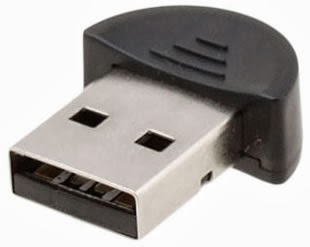
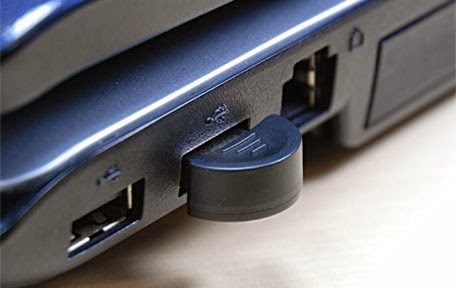
- Installed ' pulseaudio ' package using Synaptic Package Manager as shown below

- Installed ' pulseaudio-module-bluetooth ' package using Synaptic Package Manager as shown below

- Installed ' pulseaudio-module-gconf ' package using Synaptic Package Manager as shown below

- Installed ' pulseaudio-module-jack ' package using Synaptic Package Manager as shown below

- Installed ' pavucontrol ' package using Synaptic Package Manager as shown below

- After that logout and login from the Linux Desktop as shown below

- Then open up the LXTerminal and run the command under su mode # alsamixer ,then, we should get a GUI that says CHIP and CARD is PulseAudio. This can be seen as shown below.

- Then install ' blueman ' package using Synaptic Package Manager. ' Blueman ' package is a GUI tool for pairing devices

- Then press the small button on the PHILIPS Bluetooth Speaker until it says " SHOQBOX READY FOR PAIRING "
- Then run the ' Bluetooth Manager ' and Click ' Search ' to begin searching for the PHILIPS SHOQBOX SB7200 Bluetooth Speaker
- After the PHILIPS SHOQBOX SB7200 Bluetooth Speaker is found, highlight the " SHOQBOX SB7200 "
- Then Click the ' key ' to pair, after that you should hear the PHILIPS Bluetooth Speaker says
Friday, 3 January 2014
Pairing the MSI GE70 laptop (installed with Linux OS Ubuntu 13.04) with PHILIPS Shoqbox SB7200
- Move mouse pointer to the System Settings and Click once. The System Settings is on the left hand side of the display. Then, a System Settings GUI will appear as shown below
 |
System Settings with Bluetooth icon as shown above
 |


Then minimize the ' Bluetooth New Device Setup ' and ' Click ' SHOQBOX SB7200 SERIES once and then ' Click ' Sound Settings once and then another GUI will appear as shown below

Then highlight the ' Bluetooth Output SHOQBOX SB7200 SERIES ' and Click ' Analog Stereo Output ' and Select ' High Fidelity Playback (A2DP) as shown below

After that we can play any media files ( .mp3 or .mp4 or .wav ) by using our favorite media player software and the sound will come out from the PHILIPS Bluetooth speaker (PHILIPS Shoqbox SB7200). For me, my favorite media player is vlc software from VideoLan. As an example, I am playing a song/music by Paul Mauriat using vlc as shown below


As a Linux Operating System user/enthusiast, I wish I can connect my KNOPPIX 7.2 with my PHILIPS Bluetooth speaker ( PHILIPS Shoqbox SB7200 ) simple and easy just like what I did with Linux Ubuntu. Thank you very much to the Linux Ubuntu user who have provided me with this step-by-step procedures or step-by-step instructions on how to connect my Linux Ubuntu laptop to my PHILIPS Bluetooth speaker ( PHILIPS Shoqbox SB7200 ).
Subscribe to:
Posts (Atom)