
Wednesday, 6 August 2014

Monday, 14 July 2014
Installed Windows 7 Operating System on a 60 GB SSD (use it as an External USB Hard Disk Drive)
- Connect the 60 GB SSD usb hard drive to the usb port of the MSI GE70 computer hardware via the 2.5" sata to usb enclosure. Connect also another 20 GB usb hard disk drive to another usb port of the MSI GE70 hardware. For the 20 GB usb hard disk drive, I used a 20 GB IDE hard disk which is connected to a IDE/SATA to USB Adapter cable Make sure the MSI GE70 is installed with Windows 7 Operating System. Choose any version of the Windows 7 OS . For this example I installed the MSI GE70 hardware with Windows 7 Professional OS .
Thursday, 6 March 2014
Pairing the MSI GE70 laptop (installed with Linux OS Knoppix 7.2) with PHILIPS Shoqbox SB7200
- Insert a bluetooth usb dongle first on the MSI GE70 laptop as shown below
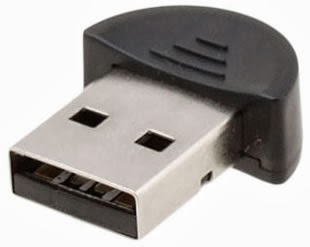
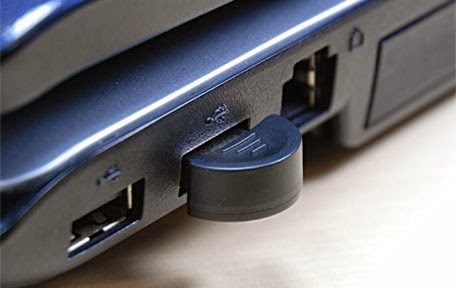
- Installed ' pulseaudio ' package using Synaptic Package Manager as shown below

- Installed ' pulseaudio-module-bluetooth ' package using Synaptic Package Manager as shown below

- Installed ' pulseaudio-module-gconf ' package using Synaptic Package Manager as shown below

- Installed ' pulseaudio-module-jack ' package using Synaptic Package Manager as shown below

- Installed ' pavucontrol ' package using Synaptic Package Manager as shown below

- After that logout and login from the Linux Desktop as shown below

- Then open up the LXTerminal and run the command under su mode # alsamixer ,then, we should get a GUI that says CHIP and CARD is PulseAudio. This can be seen as shown below.

- Then install ' blueman ' package using Synaptic Package Manager. ' Blueman ' package is a GUI tool for pairing devices

- Then press the small button on the PHILIPS Bluetooth Speaker until it says " SHOQBOX READY FOR PAIRING "
- Then run the ' Bluetooth Manager ' and Click ' Search ' to begin searching for the PHILIPS SHOQBOX SB7200 Bluetooth Speaker
- After the PHILIPS SHOQBOX SB7200 Bluetooth Speaker is found, highlight the " SHOQBOX SB7200 "
- Then Click the ' key ' to pair, after that you should hear the PHILIPS Bluetooth Speaker says
Friday, 3 January 2014
Pairing the MSI GE70 laptop (installed with Linux OS Ubuntu 13.04) with PHILIPS Shoqbox SB7200
- Move mouse pointer to the System Settings and Click once. The System Settings is on the left hand side of the display. Then, a System Settings GUI will appear as shown below
 |
System Settings with Bluetooth icon as shown above
 |


Then minimize the ' Bluetooth New Device Setup ' and ' Click ' SHOQBOX SB7200 SERIES once and then ' Click ' Sound Settings once and then another GUI will appear as shown below

Then highlight the ' Bluetooth Output SHOQBOX SB7200 SERIES ' and Click ' Analog Stereo Output ' and Select ' High Fidelity Playback (A2DP) as shown below

After that we can play any media files ( .mp3 or .mp4 or .wav ) by using our favorite media player software and the sound will come out from the PHILIPS Bluetooth speaker (PHILIPS Shoqbox SB7200). For me, my favorite media player is vlc software from VideoLan. As an example, I am playing a song/music by Paul Mauriat using vlc as shown below


As a Linux Operating System user/enthusiast, I wish I can connect my KNOPPIX 7.2 with my PHILIPS Bluetooth speaker ( PHILIPS Shoqbox SB7200 ) simple and easy just like what I did with Linux Ubuntu. Thank you very much to the Linux Ubuntu user who have provided me with this step-by-step procedures or step-by-step instructions on how to connect my Linux Ubuntu laptop to my PHILIPS Bluetooth speaker ( PHILIPS Shoqbox SB7200 ).
Thursday, 31 October 2013
Installing wkhtmltopdf software on Linux Operating System KNOPPIX 7.2
1. Installed wkhtmltopdf on Linux Operating System KNOPPIX 7.2 using Synaptic Package Manager by
searching for the software as shown below

2. Click ' Search ' then the software ' wkhtmltopdf ' will appear below the package with the square box
colored green. In this case, the square box next to the ' wkhtmltopdf ' is colored green because the
software was installed earlier as shown below.

3. To run the software, open a ' root terminal ' window then choose whatever website or whatever
webpage that we want to convert to pdf by selecting the website URL or the webpage URL then
run the Linux command as shown below.
 |
| Above is an example of a webpage or a website that I want to convert to PDF |
4. Click the URL and ' Select All ' and then ' Copy " and ' Paste ' to the ' root terminal window ' after
typing/keying the word ' wkhtmltopdf ' as shown below. Also, please do not forget to save the PDF
file under whatever name you prefer. In this case I choose to save the PDF file under the name
putin.pdf
5. This basically complete the installation of the ' wkhtmltopdf ' software for the Linux Operating System
KNOPPIX 7.2
root@Microknoppix:/home/knoppix# wkhtmltopdf http://www.iol.co.za/news/world/putin-now-world-s-most-powerful-person-1.1600030#.UnOBUVRhTOd putin.pdf
Loading page (1/2)
Warning: SSL error ignored
QFont::setPixelSize: Pixel size <= 0 (0)===============> ] 90%
Warning: SSL error ignored
Printing pages (2/2)
QFont::setPixelSize: Pixel size <= 0 (0)
Done
root@Microknoppix:/home/knoppix#
root@Microknoppix:/home/knoppix#
root@Microknoppix:/home/knoppix#
root@Microknoppix:/home/knoppix#
root@Microknoppix:/home/knoppix# ls -alh
ls: cannot access .gvfs: Permission denied
total 3.9M
drwxr-xr-x 47 knoppix knoppix 824 Nov 1 06:33 .
drwxr-xr-x 4 root root 72 Oct 24 19:33 ..
drwx------ 4 knoppix knoppix 2.0K Feb 3 2011 .adobe
-rw-r--r-- 1 root root 438K Nov 1 06:28 bnpas.pdf
drwx------ 17 knoppix knoppix 424 Nov 1 06:15 .cache
drwx------ 30 knoppix knoppix 400 Oct 29 18:30 .config
drwx------ 3 knoppix knoppix 80 Oct 24 19:33 .dbus
drwxr-xr-x 2 knoppix knoppix 2.0K Jan 12 2010 .debtags
drwxr-xr-x 2 knoppix knoppix 192 Nov 1 06:13 Desktop
drwxrwxrwx 10 knoppix knoppix 456 Oct 31 11:27 Downloads
drwxr-xr-x 2 knoppix knoppix 384 Oct 26 06:38 dwhelper
drwxr-xr-x 2 knoppix knoppix 2.0K Apr 6 2012 .elinks
-rw------- 1 knoppix knoppix 16 Sep 14 2009 .esd_auth
drwxr-xr-x 2 knoppix knoppix 112 Oct 24 20:08 .fontconfig
-rw-r--r-- 1 knoppix knoppix 514 Feb 7 2010 .fonts.conf
drwxr-xr-x 6 knoppix knoppix 96 Nov 1 06:13 .gconf
drwx------ 2 knoppix knoppix 2.0K Sep 13 2011 .gconfd
drwxr-xr-x 24 knoppix knoppix 6.0K Feb 4 2013 .gimp-2.8
drwxr-xr-x 3 knoppix knoppix 72 Oct 24 19:33 .gnome
drwx------ 4 knoppix knoppix 2.0K Jun 30 2011 .gnome2
drwx------ 2 knoppix knoppix 2.0K Jun 14 2009 .gnome2_private
drwxr-xr-x 2 knoppix knoppix 48 Oct 24 19:33 .gnome_private
drwxr-xr-x 2 knoppix knoppix 88 Oct 24 20:31 .gstreamer-0.10
-rw-r--r-- 1 knoppix knoppix 32 Jan 26 2010 .gtkrc-2.0
?????????? ? ? ? ? ? .gvfs
-rw------- 1 knoppix knoppix 342 Oct 29 17:02 .ICEauthority
drwxr-xr-x 3 knoppix knoppix 2.0K Aug 28 2010 .java
drwxr-xr-x 10 knoppix knoppix 152 Feb 3 2010 .kde
-rw-r--r-- 1 knoppix knoppix 427 Jun 24 16:50 .kderc
-rw------- 1 knoppix knoppix 186 Jun 13 21:23 .lesshst
drwxr-xr-x 4 knoppix knoppix 96 Jan 12 2010 .local
drwx------ 4 knoppix knoppix 80 Oct 24 20:06 .macromedia
drwx------ 2 knoppix knoppix 2.0K Jan 12 2010 .mc
drwx------ 3 knoppix knoppix 72 Oct 29 17:02 .mission-control
drwx------ 5 knoppix users 72 Oct 24 19:37 .mozilla
drwx------ 3 knoppix knoppix 2.0K Jul 14 2008 .mozilla-thunderbird
drwxr-xr-x 2 knoppix knoppix 2.0K Feb 7 2012 .mplayer
drwx------ 3 knoppix knoppix 2.0K Feb 3 2011 .pki
drwx------ 2 knoppix knoppix 104 Nov 1 06:15 .pulse
-rw------- 1 knoppix knoppix 256 Jun 13 21:18 .pulse-cookie
-rw-r--r-- 1 root root 3.4M Nov 1 06:33 putin.pdf
drwxr-xr-x 2 knoppix knoppix 96 Nov 1 06:13 .qt
drwxr-xr-x 2 knoppix knoppix 48 Oct 24 19:33 Templates
drwx------ 5 knoppix knoppix 72 Oct 24 20:31 .thumbnails
-rw-r--r-- 1 knoppix knoppix 1.1K Aug 31 2010 .wxMaxima
-rw------- 1 knoppix knoppix 106 Oct 24 19:33 .Xauthority
-rwxr-xr-x 1 knoppix knoppix 11K Aug 5 2012 .xscreensaver
-rw------- 1 knoppix knoppix 0 Nov 1 06:13 .xsession-errors
-rw-r--r-- 1 knoppix knoppix 30 Oct 24 19:33 .xvkbd
root@Microknoppix:/home/knoppix# ls -alh *.pdf
-rw-r--r-- 1 root root 438K Nov 1 06:28 bnpas.pdf
-rw-r--r-- 1 root root 3.4M Nov 1 06:33 putin.pdf
root@Microknoppix:/home/knoppix#
root@Microknoppix:/home/knoppix#
root@Microknoppix:/home/knoppix#
Installing google chrome for Linux
1. Obtain the latest google chrome version from https://www.google.com

2. Click ' Download Chrome ' and save the google chrome software inside the \tmp folder as shown
below. Since Linux Operating System Knoppix 7.2 is Debian-based we downloaded the Debian-based
version of the Firefox software, that is, google-chrome-stable_current_i386.deb

root@Microknoppix:/home/knoppix#
root@Microknoppix:/home/knoppix#
root@Microknoppix:/home/knoppix# cd /tmp
root@Microknoppix:/tmp# ls -alh
total 68M
drwxrwxrwt 11 root root 360 Oct 31 13:13 .
drwxr-xr-x 18 root root 0 Oct 31 08:22 ..
drwx------ 2 knoppix knoppix 80 Oct 31 09:23 .com.google.Chrome.2d43a0
drwxr-xr-x 8 root root 880 Sep 10 22:08 firefox
-rwxrwxrwx 1 knoppix knoppix 28M Oct 26 14:33 firefox-24.0.tar.bz2
-rw------- 1 root root 41M Oct 31 12:01 google-chrome-stable_current_i386.deb
drwx------ 2 knoppix knoppix 80 Oct 31 12:17 kde-knoppix
drwx------ 2 knoppix knoppix 80 Oct 31 13:09 ksocket-knoppix
drwx------ 2 knoppix knoppix 60 Oct 31 09:20 libgksu-71aYKU
srwxr-xr-x 1 root root 0 Oct 31 09:20 .lxterminal-socket:0-root
srwxr-xr-x 1 knoppix knoppix 0 Oct 31 08:23 .menu-cached-:0-knoppix
drwx------ 2 root root 40 Dec 31 1969 orbit-root
srwxr-xr-x 1 knoppix knoppix 0 Oct 31 08:23 .pcmanfm-socket--0-knoppix
drwx------ 2 knoppix knoppix 40 Oct 31 09:23 pulse-PKdhtXMmr18n
-rw------- 1 knoppix knoppix 171 Oct 31 08:23 serverauth.G2opkebv1G
drwx------ 2 knoppix knoppix 60 Oct 31 08:23 ssh-TYo5gipDkQAC
-r--r--r-- 1 root root 11 Oct 31 08:23 .X0-lock
drwxrwxrwt 2 root root 60 Oct 31 08:23 .X11-unix
root@Microknoppix:/tmp#
3. Installed the firefox software by invoking the Linux command
/tmp# dpkg -i google-chrome-stable_current_i386.deb then the firefox
software will be up and running.
/tmp# dpkg -i google-chrome-stable_current_i386.deb then the firefox
software will be up and running.
Tuesday, 29 October 2013
Installing Firefox 24.0
1. Obtain the latest firefox version from https://www.mozilla.org

2. Click ' Firefox Free Download '
3. Installed 'firefox-24.0.tar.bz2 ' at # \tmp folder as shown below

4. Then click ' Save ' and the file ' firefox-24.0.tar.bz2 ' will be downloaded
and this can be seen at the bottom left hand corner as shown below.


5. Open up a root terminal window and change directory to /tmp and install
the software as shown below by invoking the command
# tar xvjf firefox-24.0.tar.bz2


6. After that a ' firefox ' folder or directory is created inside the \tmp as
shown below. Then change directory to the firefox folder # cd \firefox
and install the firefox software by invoking the command # ./firefox as
shown below
total 28M
drwxrwxrwt 8 root root 280 Oct 31 11:22 .
drwxr-xr-x 18 root root 0 Oct 31 08:22 ..
drwx------ 2 knoppix knoppix 80 Oct 31 09:23 .com.google.Chrome.2d43a0
drwxr-xr-x 8 root root 880 Sep 10 22:08 firefox
-rwxrwxrwx 1 knoppix knoppix 28M Oct 26 14:33 firefox-24.0.tar.bz2
drwx------ 2 knoppix knoppix 60 Oct 31 09:20 libgksu-71aYKU
srwxr-xr-x 1 root root 0 Oct 31 09:20 .lxterminal-socket:0-root
srwxr-xr-x 1 knoppix knoppix 0 Oct 31 08:23 .menu-cached-:0-knoppix
srwxr-xr-x 1 knoppix knoppix 0 Oct 31 08:23 .pcmanfm-socket--0-knoppix
drwx------ 2 knoppix knoppix 40 Oct 31 09:23 pulse-PKdhtXMmr18n
-rw------- 1 knoppix knoppix 171 Oct 31 08:23 serverauth.G2opkebv1G
drwx------ 2 knoppix knoppix 60 Oct 31 08:23 ssh-TYo5gipDkQAC
-r--r--r-- 1 root root 11 Oct 31 08:23 .X0-lock
drwxrwxrwt 2 root root 60 Oct 31 08:23 .X11-unix
root@Microknoppix:/tmp#
root@Microknoppix:/tmp#
root@Microknoppix:/tmp#
root@Microknoppix:/tmp#
root@Microknoppix:/tmp# ls -alh
total 28M
drwxrwxrwt 8 root root 280 Oct 31 11:22 .
drwxr-xr-x 18 root root 0 Oct 31 08:22 ..
drwx------ 2 knoppix knoppix 80 Oct 31 09:23 .com.google.Chrome.2d43a0
drwxr-xr-x 8 root root 880 Sep 10 22:08 firefox
-rwxrwxrwx 1 knoppix knoppix 28M Oct 26 14:33 firefox-24.0.tar.bz2
drwx------ 2 knoppix knoppix 60 Oct 31 09:20 libgksu-71aYKU
srwxr-xr-x 1 root root 0 Oct 31 09:20 .lxterminal-socket:0-root
srwxr-xr-x 1 knoppix knoppix 0 Oct 31 08:23 .menu-cached-:0-knoppix
srwxr-xr-x 1 knoppix knoppix 0 Oct 31 08:23 .pcmanfm-socket--0-knoppix
drwx------ 2 knoppix knoppix 40 Oct 31 09:23 pulse-PKdhtXMmr18n
-rw------- 1 knoppix knoppix 171 Oct 31 08:23 serverauth.G2opkebv1G
drwx------ 2 knoppix knoppix 60 Oct 31 08:23 ssh-TYo5gipDkQAC
-r--r--r-- 1 root root 11 Oct 31 08:23 .X0-lock
drwxrwxrwt 2 root root 60 Oct 31 08:23 .X11-unix
root@Microknoppix:/tmp# cd \firefox
root@Microknoppix:/tmp/firefox#
root@Microknoppix:/tmp/firefox# ls -alh
total 52M
drwxr-xr-x 8 root root 880 Sep 10 22:08 .
drwxrwxrwt 8 root root 280 Oct 31 11:22 ..
-rw-r--r-- 1 root root 610 Sep 10 20:48 application.ini
drwxr-xr-x 7 root root 220 Sep 10 22:08 browser
-rw-r--r-- 1 root root 40 Sep 10 22:07 chrome.manifest
drwxr-xr-x 2 root root 100 Sep 10 22:08 components
-rwxr-xr-x 1 root root 121K Sep 10 22:08 crashreporter
-rw-r--r-- 1 root root 4.0K Sep 10 19:15 crashreporter.ini
drwxr-xr-x 3 root root 60 Sep 10 22:08 defaults
-rw-r--r-- 1 root root 127 Sep 10 21:53 dependentlibs.list
drwxr-xr-x 2 root root 80 Sep 10 22:07 dictionaries
-rwxr-xr-x 1 root root 131K Sep 10 22:08 firefox
-rwxr-xr-x 1 root root 131K Sep 10 22:08 firefox-bin
drwxr-xr-x 2 root root 60 Sep 10 22:08 icons
-rw-r--r-- 1 root root 899 Sep 10 22:08 libfreebl3.chk
-rwxr-xr-x 1 root root 408K Sep 10 22:08 libfreebl3.so
-rwxr-xr-x 1 root root 7.3K Sep 10 22:07 libmozalloc.so
-rwxr-xr-x 1 root root 719K Sep 10 22:08 libmozsqlite3.so
-rwxr-xr-x 1 root root 226K Sep 10 22:07 libnspr4.so
-rwxr-xr-x 1 root root 988K Sep 10 22:08 libnss3.so
-rwxr-xr-x 1 root root 432K Sep 10 22:08 libnssckbi.so
-rw-r--r-- 1 root root 899 Sep 10 22:08 libnssdbm3.chk
-rwxr-xr-x 1 root root 141K Sep 10 22:08 libnssdbm3.so
-rwxr-xr-x 1 root root 126K Sep 10 22:08 libnssutil3.so
-rwxr-xr-x 1 root root 16K Sep 10 22:07 libplc4.so
-rwxr-xr-x 1 root root 14K Sep 10 22:07 libplds4.so
-rwxr-xr-x 1 root root 141K Sep 10 22:08 libsmime3.so
-rw-r--r-- 1 root root 899 Sep 10 22:08 libsoftokn3.chk
-rwxr-xr-x 1 root root 221K Sep 10 22:08 libsoftokn3.so
-rwxr-xr-x 1 root root 198K Sep 10 22:08 libssl3.so
-rwxr-xr-x 1 root root 41M Sep 10 22:08 libxul.so
-rwxr-xr-x 1 root root 121K Sep 10 22:08 mozilla-xremote-client
-rw-r--r-- 1 root root 6.9M Sep 10 22:07 omni.ja
-rw-r--r-- 1 root root 135 Sep 10 21:52 platform.ini
-rwxr-xr-x 1 root root 112K Sep 10 22:08 plugin-container
-rw-r--r-- 1 root root 2.3K Sep 10 22:08 precomplete
-rw-r--r-- 1 root root 36K Sep 10 22:08 removed-files
-rwxr-xr-x 1 root root 8.8K Sep 10 19:14 run-mozilla.sh
-rw-r--r-- 1 root root 825 Sep 10 19:15 Throbber-small.gif
-rwxr-xr-x 1 root root 163K Sep 10 22:08 updater
-rw-r--r-- 1 root root 681 Sep 10 21:55 updater.ini
-rw-r--r-- 1 root root 132 Sep 10 20:48 update-settings.ini
drwxr-xr-x 2 root root 80 Sep 10 22:08 webapprt
-rwxr-xr-x 1 root root 163K Sep 10 22:08 webapprt-stub
root@Microknoppix:/tmp/firefox#
root@Microknoppix:/tmp/firefox# ./firefox
7. Then we should be able to get the firefox software for Linux OS up and running.
Subscribe to:
Posts (Atom)